Override response status codes
Return any HTTP status from 200–599 for matching Fetch and XHR requests.
Response mocking, without the detour
A focused Chrome extension for replacing Fetch and XHR response status codes and bodies with local URL rules. Test every edge case without changing your API.
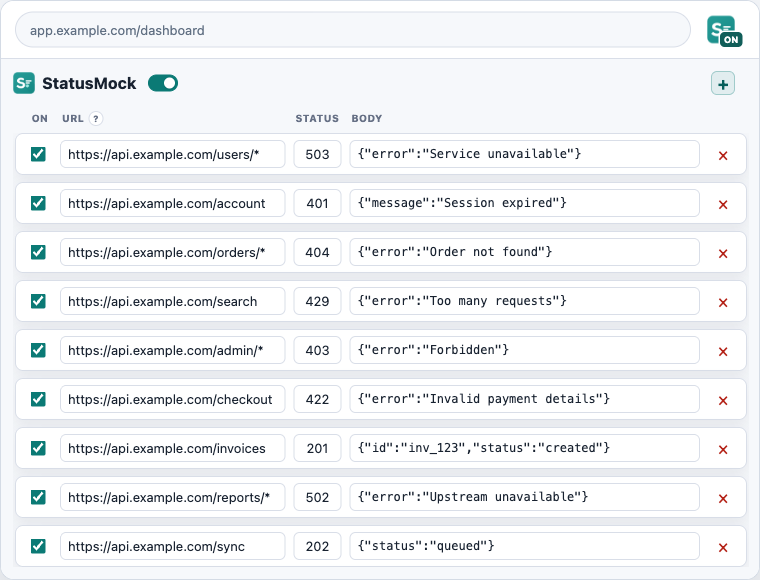
Built for failure paths
StatusMock keeps the workflow deliberately narrow: add a URL rule, choose a status, write a response body, and enable it for the current tab. The next matching request receives your local response.
No proxy setup, test-server branch, or application-code change is required. Turn the tab switch off and the real API is back.
Three small steps
Paste a full URL and use wildcards for dynamic path segments or query values.
https://api.example.com/orders/*Set an HTTP status and add the JSON or text body your UI should receive.
503 · {"error":"Try again"}Flip StatusMock on for the current tab, reload, and test the real user flow.
Mocking activeFeature set
Return any HTTP status from 200–599 for matching Fetch and XHR requests.
Respond with JSON or plain text while keeping safe headers from the original response.
Use simple * and ? wildcards to target one endpoint or an entire API path.
Enable mocking only where you need it. Every new tab starts cleanly turned off.
Arrange rules in a predictable order; the first enabled match wins.
Rules remain in Chrome extension storage and never leave your browser.
Common uses
Build and review the awkward states before a user finds them.
Preview empty, loading, unauthorized, and server-error states on demand.
Reproduce a production response without touching the backend.
Demo recovery flows even when every real service is healthy.
Unblock frontend work before an API edge case is implemented.
Keep QA scenarios repeatable with saved URL rules.
FAQ
StatusMock modifies Fetch and XMLHttpRequest responses in explicitly enabled Chrome tabs. Normal page navigations and other request types are left alone.
Yes. Valid JSON is formatted in the editor, while any other non-empty value can still be returned as plain text.
Patterns match the complete URL. An asterisk matches any number of characters and a question mark matches exactly one character.
Replacing response bodies requires Chrome’s debugger permission and the DevTools Protocol. StatusMock attaches only to tabs you explicitly enable while a valid rule exists.
No. StatusMock has no analytics, tracking, external services, or developer-controlled servers. Your rules stay in local browser storage.
Ready when the API is not